
Edge weaken/strengthen
V1.0


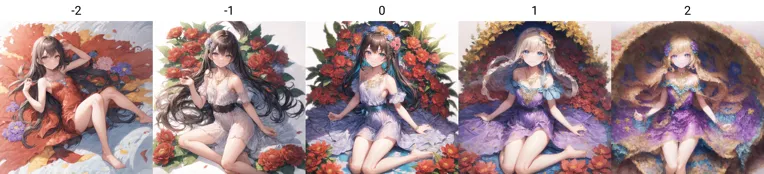











This rola model can enhance or reduce or even fuse the edges of the image:
When the weight is set to a positive value, the edge become blurred, which can achieve the effect similar to softening, or even similar to Gouache painting and oil painting when the weight is increased.
Setting the weight to a negative value makes the edges clearer and making the lines smoother. It can also make characters in the distance clearer;
Due to the different styles of each checkpoint model, there is no fixed suitable weight. Normally a recommended value is -2 to +2;
Usage 1: When using positive weights, there is a slight hidden effect: the overall character is more likely to be stained by the background color. Recommend using Lora together with add_detail. The recommended magnification method is latent, which can make the image more colorful and artistic.
Usage 2: Using negative weights to make the edges clearer, but this lora won't make the lines too thick and make the distant characters clearer. Please refer to the crowd of girls in the legend for details. (The large depth of field is caused by my background control Lora).
At the same time, it can reduce the image collapse caused by redrawing, when using
Usage 3: When using a realistic model, setting positive weights would produce a soft light-like effect, which has a certain improvement effect on checkpoint models with darker tones.
このrolaモデルは、画面のエッジを強化、または軽減、融合したりすることができます。
ウェイト値を正の値に設定し、エッジをぼかすと、ソフト化に類似した効果が発揮します。ウェイトをさらにアップした時に、水粉画、油絵のような効果が現れることもあります。
ウェイト値を負の値に設定することでエッジが鮮明になり、線が滑らかになる効果があり、遠くの人物もはっきりさせることができます。
checkpointモデルごとに画風が異なるため、適切なウェイト値が固定されません。しかしながら、普通の場合推奨値-2 ~+2、
使用法1:正の重みを使用した場合にわずかな隠れ効果がある:人物全体が背景色に染まりやすい。推薦には、add_detailのloraを同時に使用。推薦の拡大方法はlatentで、画面の色を更に豊富にすることができて、画面を芸術感に富ませることができます。
使用法2:負の重みを設定する時、エッジをより鮮明にしますが、線を太くすることはありません。遠くの人物をもっとはっきりさせることができて、詳しくは凡例の女の子の人混みを参照してください。(巨大な被写界深度は私の背景制御loraによるもの)。また、tileを使用して画像を拡大する場合、再描画による画像の崩壊を軽減することができます。
使用法3:写真類のモデルに使用する場合、正の重みを設定する際に柔らかい光のような効果を発揮し、色調が暗いなcheckpoint モデルに対して一定の改善効果がある。