00-Role Consistency FaceID Basic Workflow-ComfyUI
V2

 Image info
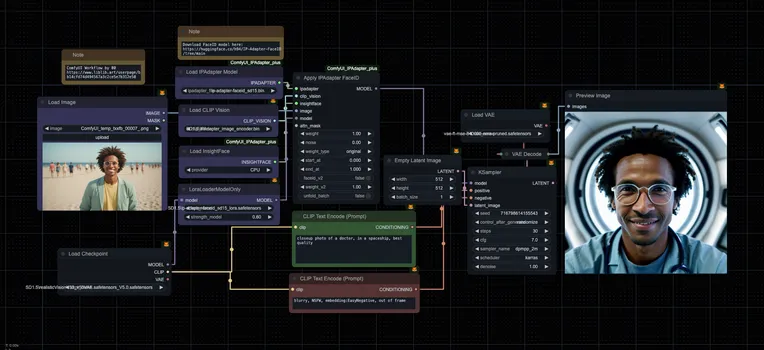 Image info
Update: The Apply IPAdapter FaceID node in V1 has been updated, running it will prompt CLIP vision mismatch with InsightFace. You need to update the ComfyUI and IPAdapter_plus plugins, and then use the workflow of the V2 version.
- Latest IPAdapter FaceID model
- Using face recognition model (InsightFace) for facial embedding
- Added LoRA to improve ID consistency
FaceID model download link: https://huggingface.co/h94/IP-Adapter-FaceID/tree/main
Specifically
1. Load IPAdapter Model node needs to download this model and place it in the ComfyUI custom_nodes\ComfyUI_IPAdapter_plus\models folder:
https://huggingface.co/h94/IP-Adapter-FaceID/resolve/main/ip-adapter-faceid_sd15.bin
2. LoraLoaderModelOnly node needs to download this model and place it in the Lora folder:
https://huggingface.co/h94/IP-Adapter-FaceID/resolve/main/ip-adapter-faceid_sd15_lora.safetensors
3. Load CLIP Vision node needs to download the following model and place it in the ComfyUI\ComfyUI\models\clip_vision folder
https://huggingface.co/h94/IP-Adapter/resolve/main/models/image_encoder/pytorch_model.bin
Welcome to follow video number 00 by scanning the code 🤳